To protect your privacy and balance, your sensitive card details and details remain hidden and are only displayed after verifying your identity.
In order to securely access and view your sensitive card details, please follow these steps:
Steps:
From the dashboard, navigate to the "My Cards" section.
Click on the "Card" icon.
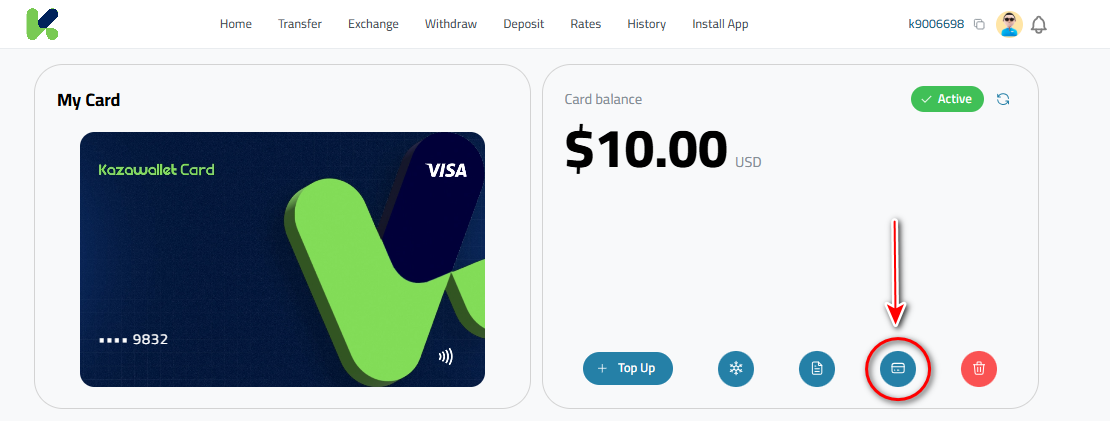
Enter your verification code or payment password to confirm your identity.
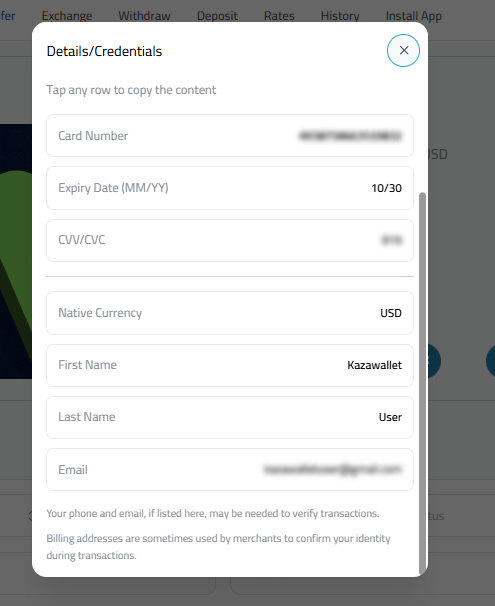
The "Details" window will appear, displaying the full card number, expiration date, and the security code (CVV).
Important Security Alerts:
- Auto-Close: The details and details window close automatically after 60 seconds to safeguard your data from unauthorized viewing.
- Confidentiality: Please keep all your card Information strictly confidential. Anyone with this information can access your balance and make purchases on your behalf.